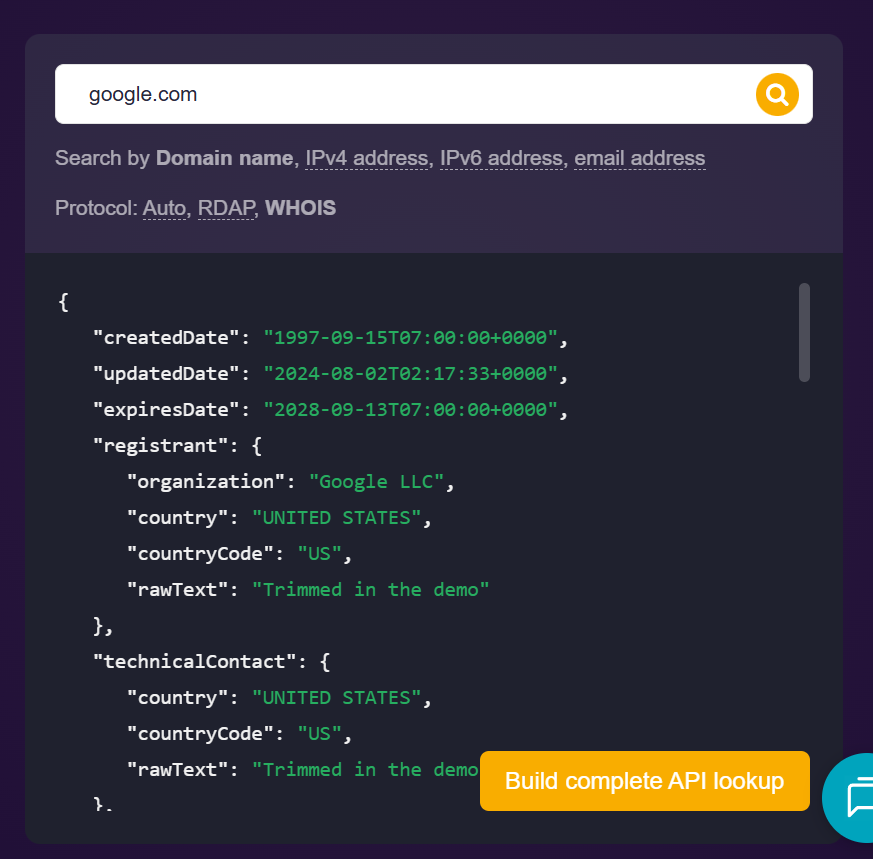
> For the complete documentation index, see [llms.txt](https://tools.osintnewsletter.com/llms.txt). Markdown versions of documentation pages are available by appending `.md` to page URLs; this page is available as [Markdown](https://tools.osintnewsletter.com/osint-tools/whois-api.md).
# WHOIS API
Tool Description : A domain registration tool showing who owns a domain, when it was created, and how it’s configured.
| **WHOIS API** | **Quick Overview** |
| ---------------- | ------------------------------------------------------------------------------------------------------------------ |
| URL | |
| What it does | Provides detailed WHOIS records, including domain ownership, registrar info, dates, and sometimes contact details. |
| How to use it | Enter a domain, run a lookup, and review structured WHOIS data. |
| Cost | Partially free (limited lookups, paid plans for full access). |
| Account required | Yes (for most features/API access) |
| Cookies | A mix of functional, analytics, and marketing tracking, with notable third-party tracking from LinkedIn. |
| Ownership | Owned and operated by WhoisXML API, founded by Jonathan Zhang. |
| Use in Reporting | Useful for identifying domain ownership, timelines, and infrastructure links. |
### What does the WHOIS API Do?
WHOIS API lets you dig into domain registration data, helping you understand who registered a domain, when, and through which provider. It’s a core tool for building timelines, linking infrastructure, and supporting attribution.
**The lowdown:** It’s a go-to OSINT tool for domain intelligence, best used alongside other tools for deeper investigation.
### How to Use:
1. **Go to**[ **https://whois.whoisxmlapi.com/**](https://whois.whoisxmlapi.com/) **and enter a domain name (e.g.** [**Google.com**](http://google.com)**), IPv4 address, IPv6 address, or email address into the top right search bar.**
**2. Simply review the results incluing registrar, dates, nameservers, and registrant data.**
### Cost
* [ ] Free
* [x] Partially Free
* [ ] Paid
Limited lookups on the free version. Upgrade to paid for API access, bulk data and historical WHOIS.
## Data Processing
### Account Required:
* [x] Yes
* [x] No
No for basic web lookups may be possible in limited form. Yes for API and extended use.
### Cookies:
A mix of functional, analytics, and marketing tracking, with notable third-party tracking from LinkedIn.
### Use in Reporting
WHOIS API can be used to:
* Identify domain ownership and registrars.
* Establish timelines (creation, updates, expiry).
* Link domains via shared details (emails, nameservers).
* Support attribution in investigations.
[As reported on the WHOIS API website](https://www.whoisxmlapi.com/blog/phishing-website-investigation-with-whois-xml-api-and-threat-intelligence-platform-toolsets/), a published investigation shows how WhoisXML API tools were used to analyse a fake Equifax phishing domain in 2017. Researchers used WHOIS, historical data, and infrastructure analysis to show the domain was fraudulent and trace likely origins.
| **Capabilities** | **Limitations** |
| ------------------------------------------------------------- | ------------------------------------------------------------------------- |
| Fast, structured WHOIS lookups. | Privacy protection often hides registrant details. |
| API access for automation and bulk analysis. | Not all domains expose the same level of detail. |
| Historical WHOIS (on paid plans). | Free tier is very limited. Paid plan required for serious investigations. |
| Reverse WHOIS (find domains linked to an email/organisation). | Some data may be outdated depending on registry updates. |
| Clean, exportable data for reports. |
|
### Summary
WHOIS API is most useful in the analysis and correlation stage of the OSINT workflow, helping turn raw findings into meaningful intelligence. However, data can be incomplete, outdated, or privacy-protected, and shared details (like nameservers or registrars) don’t always prove a real connection, so avoid jumping to conclusions or making definitive claims based on it alone.
### Ownership
WHOIS API is owned and operated by WhoisXML API, a provider of domain, IP, and DNS intelligence services. The founder and CEO is [Jonathan Zhang](https://www.linkedin.com/in/jonathanmzhang/), who resides in California, USA.
### Ethical Considerations
* Respect privacy protections and legal boundaries.
* Avoid misuse of personal data revealed in WHOIS.
* Use findings responsibly in reporting and attribution.
* Be cautious of false attribution from shared infrastructure.
### Related Tools:
* SecurityTrails
* DomainTools
* [Shodan](/osint-tools/shodan.md)
* ViewDNS
#### Sources